
Science & Technology · UPSC Notes
Information Technology — UPSC Science & Tech Notes
Free, exam-focused notes for UPSC Prelims and Mains, with Prelims tips and Mains points for every topic. 25 topics.
Open in the interactive reader: bookmarks, progress tracking and read-aloud.
Introduction to IT and the Electromagnetic Spectrum
Information Technology (IT) is the backbone of modern business, serving as a subset of the broader ICT (Information and Communications Technology). At the heart of all wireless communication—from your Wi-Fi to satellite TV—is the Electromagnetic Spectrum, a range of energy waves that travel through space at the speed of light.
1. Defining IT vs. ICT
While often used interchangeably, IT is actually a specialized part of the much larger ICT umbrella.
IT (Information Technology): Focuses on the storage, retrieval, and manipulation of data using computers.
ICT (Information and Communication Technology): A broader term that includes Computer Technology PLUS Telecommunications (phones), Optical Communications (Fiber optics), and Satellite systems.
2. The Electromagnetic (EM) Spectrum
Everything in the digital world travels on waves. These waves differ based on their wavelength and frequency.
Radio Waves: Longest wavelength. Used for FM/AM radio and broadcasting from stars.
Microwaves: Used for cooking food and, more importantly in IT, for point-to-point communication and studying galaxy structures.
Infrared: Sensed as heat. Used in remote controls and night-vision goggles.
Visible Light: The only part of the spectrum human eyes can see.
Ultraviolet (UV): Higher energy waves from the sun; responsible for tanning but also used in specialized space imaging.
X-rays: High energy waves that can penetrate soft tissue (dentistry/security).
Gamma Rays: The highest energy waves. Generated by the universe and used in advanced medical imaging.
| Radiation Type | Everyday Use | Space/Tech Use |
|---|---|---|
| Radio | Radio/TV stations | Emitted by stars |
| Microwave | Microwave ovens | Mapping galaxy structures |
| Infrared | Remote controls / Night vision | Mapping interstellar dust |
| Ultraviolet | Sun tanning / Sterilization | Imaging 'hot' objects in space |
| X-ray | Dental/Airport security | Studying hot gases in Universe |
Prelims tips
- Frequency vs. Wavelength: As frequency increases (Radio → Gamma), wavelength decreases.
- Energy: Higher frequency waves (UV, X-ray, Gamma) carry more energy and can be ionizing/harmful.
- IT Context: Most ICT technologies use the lower frequency end (Radio and Microwave) for communication because they travel longer distances.
- Optical Communication: Uses light (often laser/infrared) through glass fibers.
Mains points
- Digital Divide: While IT drives efficiency, the gap in ICT infrastructure (like satellite vs. fiber access) creates economic disparities between regions.
- Spectrum Management: Governments auction parts of the EM spectrum (like 5G bands) because it is a finite and highly valuable resource.
- Health & Technology: Understanding the non-ionizing nature of Radio/Microwaves vs. the ionizing nature of X-rays is crucial for public policy regarding mobile tower safety.
- Space Exploration: Multi-wavelength astronomy (using IR, X-ray, and Radio telescopes) allows scientists to see parts of the universe that are invisible to the naked eye.
Did you know?
- Radio waves can be as long as a football field, while Gamma rays are as small as the nucleus of an atom!
- Wi-Fi and Bluetooth both operate on the Microwave part of the spectrum (usually 2.4 GHz or 5 GHz).
- Your TV remote 'talks' to your television using pulses of Infrared light that you can't see, but your phone camera often can!
ICT in Everyday Life: The Digital Transformation
The integration of Information and Communications Technology (ICT) into our daily routines has transformed how we communicate, shop, bank, and learn. By using digital platforms to deliver services, we have moved toward a more efficient, Paperless, and Borderless world.
1. Pillars of Modern Digital Interaction
ICT acts as an interface between the service provider and the user, eliminating the need for physical presence in many sectors.
E-mail (Online Communication): Replaced traditional post for instant data transfer. It is the foundation of professional and personal digital correspondence.
E-commerce (Digital Business): Buying and selling goods via the internet (e.g., Amazon, Flipkart). It uses ICT for inventory management, payment gateways, and logistics tracking.
Online Banking (Digital Finance): Allows 24/7 access to financial services. Technologies like IMPS, RTGS, and UPI in India are prime examples of ICT in banking.
E-learning (Digital Education): Breaking geographical barriers, allowing students to access courses from anywhere in the world through platforms like MOOCs (Massive Open Online Courses).
E-government (Digital Governance): Delivering government services (like passport applications, tax filing, and digital lockers) directly to citizens, increasing transparency and reducing corruption.
| Sector | Traditional Method | ICT Method (E-method) |
|---|---|---|
| Communication | Letters/Post | E-mail / Instant Messaging |
| Business | Physical Stores | E-commerce (Websites/Apps) |
| Banking | Visiting Bank Branch | Mobile/Online Banking |
| Governance | Queueing at Offices | E-government Portals |
| Education | Physical Classrooms | E-learning / Virtual Classrooms |
Prelims tips
- E-governance Models: Remember G2C (Gov to Citizen), G2B (Gov to Business), and G2G (Gov to Gov).
- Digital India: A flagship program of the Government of India to transform India into a digitally empowered society.
- SWAYAM: An Indian government platform for E-learning (MOOCs).
- ICT Components: Includes hardware, software, data, and the people/networks that use them.
- IT industry location: IT is a 'footloose' industry – it is not tied to raw materials and depends on skilled manpower, reliable power and data connectivity, good universities and a pleasant climate. Bengaluru became India's 'Silicon Valley' because of its research institutions (IISc, ISRO, HAL, BEL), English-speaking engineers, moderate climate and early software parks. A 'technopolis' is a centre of high-tech manufacturing and information-based (quaternary) industry.
- IT parks: Technopark – Thiruvananthapuram (India's first IT park, 1990); Tidel Park – Chennai; HITEC City – Hyderabad; Electronics City – Bengaluru; Rajiv Gandhi Infotech Park (Hinjewadi) – Pune. Software Technology Parks of India (STPI, 1991) under MeitY gives single-window clearance and high-speed links to export-oriented software units.
Mains points
- Social Inclusion: E-governance helps in 'Last Mile Delivery' of social benefits (Direct Benefit Transfer - DBT) directly to the poor without middlemen.
- Economic Efficiency: E-commerce reduces operational costs for businesses, allowing small entrepreneurs to reach a global market.
- Cybersecurity Challenges: As ICT usage grows, the risk of data breaches, phishing, and financial fraud increases, requiring robust cyber laws.
- The Human Element: While ICT bridges distances, the 'Digital Divide' (gap between those with and without internet) remains a major socio-economic challenge.
Did you know?
- The 'e' in e-mail and e-commerce stands for 'Electronic'.
- India’s UPI (Unified Payments Interface) is one of the world's most advanced ICT systems in banking, processing billions of transactions every month.
- The first ever e-mail was sent by Ray Tomlinson in 1971; he is also the one who chose the @ symbol for addresses!
Processing Power and Moore’s Law
The evolution of computers is driven by the density of Transistors. While the fundamental architecture of the CPU has remained steady for decades, our ability to pack more components into smaller spaces has exponentially increased processing speed and decreased costs, a phenomenon captured by Moore's Law.
1. The Engine of Computing: The CPU
The Central Processing Unit (CPU) is the brain of the computer. Its primary building block is the transistor—a tiny electronic switch.
The Transistor Rule: More transistors on a chip mean the processor can handle more complex instructions simultaneously. This directly leads to faster processing speeds and the ability to manage larger amounts of memory.
Steady Architecture: Surprisingly, the 'Von Neumann architecture' (input, processing, storage, output) used 65 years ago still defines how modern chips operate today.
2. Moore’s Law: The Golden Rule of Tech
In 1965, Intel co-founder Gordon Moore noticed a pattern that would define the digital age.
The Law: The number of transistors on a microchip doubles approximately every two years.
The Economic Impact: As performance doubles, the cost of computing power is roughly halved. This is why a smartphone today is thousands of times more powerful than the room-sized computers of the 1960s, yet fits in your pocket.
3. The Future: Reaching the Physical Limit
We are now reaching a point where transistors are so small (a few atoms wide) that we face heat and 'quantum tunneling' issues.
Beyond Silicon: To keep Moore's Law alive, scientists are looking at Quantum Computing and new materials like Graphene to replace traditional silicon-based chips.
| Parameter | Change | User Benefit |
|---|---|---|
| Processing Speed | Increases | Faster multitasking & high-end gaming |
| Energy Efficiency | Increases | Better battery life in portable devices |
| Memory Capacity | Increases | Ability to run larger, complex software |
| Cost per Transistor | Decreases | Affordable technology for everyone |
Prelims tips
- Gordon Moore: Co-founder of Intel (remember the name for IT history).
- Transistor doubling period: Usually cited as 18-24 months.
- Key benefit: Speed increases, cost decreases.
- Current Trend: Many experts believe Moore's Law is slowing down because we are reaching the physical limits of silicon.
Mains points
- Innovation Pressure: Moore's Law has acted as a self-fulfilling prophecy, forcing companies to innovate rapidly to stay competitive.
- Sustainability Challenges: Rapid doubling of hardware leads to e-waste, as devices become 'obsolete' in just a few years.
- Strategic Importance: Mastery over 'nanometer' technology (how small you can make transistors) is now a matter of national security and 'Chip Diplomacy'.
- Artificial Intelligence: The surge in AI would have been impossible without the exponential growth predicted by Moore's Law, as AI requires massive processing power.
Did you know?
- Modern transistors are so small that roughly 30 million of them could fit on the head of a pin!
- If car technology had followed Moore's Law, a car today would be able to travel at the speed of light and cost less than a dollar.
- Moore's Law is not a physical law of nature (like gravity), but rather an observation and a goal that the industry has pushed to meet for decades.
Supercomputers: The Titans of Computing
When the complexity of a problem exceeds the capacity of millions of standard PCs, we turn to Supercomputers. Unlike regular computers that use a few 'cores,' supercomputers utilize Parallel Processing with thousands of processors to solve calculations that would take a normal laptop thousands of years.
1. What Defines a Supercomputer?
A supercomputer is characterized by its massive processing power and memory, measured not in 'Gigaflops' but in Petaflops (quadrillions of calculations per second) or even Exaflops.
Parallel Processing: Instead of doing one task after another, a supercomputer breaks a massive problem into tiny pieces and solves them all at the exact same time using thousands of CPUs and GPUs.
High-Speed Interconnects: The 'secret sauce' is how fast these thousands of processors can talk to each other without delay (latency).
2. Pushing the Limits of Moore's Law
As individual chips hit physical limits, supercomputers push forward by scaling 'out' rather than just 'up'.
Thermal Management: Supercomputers generate immense heat. They often require specialized liquid cooling systems or entire buildings designed for airflow.
Energy Consumption: A single top-tier supercomputer can consume as much electricity as a small town (megawatts of power).
3. Top Supercomputers & India's Position
The world's fastest computers are ranked twice a year in the TOP500 list.
Frontier (USA): The first verified Exascale supercomputer, capable of over a quintillion calculations per second.
India’s National Supercomputing Mission (NSM): Aimed at building a grid of supercomputers across the country. Famous Indian supercomputers include AIRAWAT (AI-focused), PARAM Siddhi-AI, and Pratyush/Mihir (used for weather forecasting).
| Feature | Personal Computer (PC) | Mainframe | Supercomputer |
|---|---|---|---|
| Primary Goal | General purpose/Personal | Handling millions of transactions | Maximum calculation speed |
| Performance Measure | Gigahertz (GHz) | MIPS | FLOPS (Petaflops/Exaflops) |
| User Base | Single user | Thousands of users (Banks/Insurance) | Scientific research teams |
| Example | Your Laptop/Desktop | IBM Z-series | CRAY, PARAM, Frontier |
Prelims tips
- FLOPS: Measurement unit for processing speed (Floating Point Operations Per Second).
- Petaflops: $10^{15}$ operations per second.
- Exascale: $10^{18}$ (a quintillion) operations per second.
- C-DAC: Center for Development of Advanced Computing (the nodal agency for India's PARAM series).
- AIRAWAT: Currently India's fastest AI supercomputer (ranked 75th globally in 2023).
Mains points
- Strategic Autonomy: Indigenous supercomputing missions are vital for national security, from simulating nuclear tests to decrypting advanced codes.
- Weather & Climate: India's agriculture depends on the Monsoon; supercomputers like Pratyush provide high-resolution weather models that save millions in crop losses.
- Drug Discovery: During COVID-19, supercomputers simulated billions of molecular interactions in days, a process that usually takes years in a wet lab.
- Quantum Supremacy: The next frontier isn't just bigger supercomputers, but Quantum Computers, which use Qubits to solve problems current supercomputers can't touch.
Did you know?
- The word 'FLOPS' stands for FLoating-point Operations Per Second.
- If you could do one calculation every second, it would take you 31.7 million years to do what an Exascale supercomputer does in one second!
- India's PARAM 8000, built in 1991, was India's first indigenous supercomputer after the US denied the export of a Cray supercomputer.
The Evolution of Storage: From Spinning Disks (HDD) to Silent Chips (SSD)
The digital world is moving away from mechanical parts. While the Hard Disk Drive (HDD) has been the reliable workhorse for decades, the Solid State Drive (SSD) is the modern champion. By understanding how they store data—one through Magnetism and the other through Electricity—you can understand why your devices are getting faster and thinner.
1. Hard Disk Drives (HDD): The Mechanical Record Player
Think of an HDD as a high-tech record player. Inside, there are physical disks that must spin for the computer to read data.
The Platters: These are the 'records'—circular disks coated with magnetic material that store your 1s and 0s.
The Read/Write Head: This is like the needle on the record player. It moves across the spinning disks to find your files.
The Delay (Latency): Because the disk has to physically spin to the right spot, there is a tiny delay before the file opens. This is why older computers take time to 'wake up.'
2. Solid State Drives (SSD): The Speed of Electricity
SSDs have no moving parts. They store data on interconnected flash-memory chips (similar to what's inside a USB thumb drive but much faster).
Flash Memory: Data is stored in 'cells' using electrical charges. Since nothing has to physically move, the speed of access is nearly instantaneous.
Durability: Because there are no moving arms or spinning disks, SSDs are much more resistant to physical shocks. If you drop a laptop with an SSD, your data is much safer than with an HDD.
Silent Operation: Since nothing spins, SSDs are completely silent and generate much less heat.
3. Why the Difference Matters for Beginners
The choice between HDD and SSD affects your daily experience with technology.
Boot Time: An SSD can start your computer in under 15 seconds, while an HDD might take over a minute.
Application Loading: Heavy apps like Photoshop or large games open significantly faster on an SSD.
Battery Life: Because SSDs don't need to use energy to 'spin' a motor, laptops with SSDs usually have better battery life.
| Feature | Hard Disk Drive (HDD) | Solid State Drive (SSD) |
|---|---|---|
| Speed | Slower (Mechanical) | Much Faster (Electrical) |
| Durability | Fragile (Moving parts) | Robust (No moving parts) |
| Noise | Clicking/Whirring sounds | Completely Silent |
| Price | Cheaper (More storage for less money) | More Expensive per GB |
| Best For | Massive file storage (Backups) | Installing Windows/Apps/Gaming |
Prelims tips
- Non-Volatile: Both HDD and SSD are non-volatile (they keep data when power is off).
- Fragmentation: HDDs suffer from fragmentation (files get scattered), which slows them down. SSDs don't care about fragmentation because they access all parts of the chip at the same speed.
- Form Factor: HDDs are usually 3.5 or 2.5 inches. SSDs come in the same sizes but also in tiny sticks called M.2.
- Hybrid Drives (SSHD): These contain a small amount of SSD for speed and a large HDD for storage capacity.
Mains points
- Infrastructure Modernization: Governments and businesses are migrating 'Legacy Systems' from HDD to SSD to reduce energy consumption and improve public service response times.
- Data Centers: While SSDs are used for active data, HDDs (and even Magnetic Tapes) are still used for 'Cold Storage'—data that isn't accessed often but needs to be kept for years cheaply.
- Economic Shift: The falling price of NAND flash memory (the core of SSDs) is making high-speed computing accessible to lower-income segments, bridging the Digital Divide.
- Technological Sovereignty: Developing indigenous SSD and semiconductor manufacturing is a top priority for countries to reduce reliance on foreign hardware supply chains.
Did you know?
- If you open an HDD while it's running, even a single speck of dust can crash the read/write head into the platter—this is called a 'Head Crash.'
- Modern SSDs are so fast they are often limited by the cables connecting them to the motherboard, leading to the invention of NVMe technology which plugs directly into the high-speed lanes of the computer.
- The SSD technology in your phone is what allows it to be so thin; an HDD would never fit inside a modern smartphone!
Supercomputers: The Titans of Global Computing
A Supercomputer is the ultimate expression of processing power. While a standard PC handles daily tasks, a supercomputer is built for extreme performance, measured in FLOPS. These machines occupy entire rooms and are the engines behind cutting-edge scientific research, weather modeling, and national security.
1. What Makes a Computer 'Super'?
A supercomputer isn't just a 'fast laptop'; it is a massive network of thousands of processors working together as one unit.
FLOPS (Performance): Unlike regular computers measured in Hertz (cycle speed), supercomputers are measured in Floating-point Operations Per Second (FLOPS). Modern ones operate in Petaflops (1 quadrillion calculations per second).
Massive Memory: Their memory capacity is roughly 250,000 times larger than your home PC, allowing them to hold entire climate models or genomic databases in active memory.
Environment: They generate so much heat that they must be kept in large clean rooms with sophisticated cooling systems to prevent the silicon from melting.
2. A Brief History: The Legacy of Seymour Cray
The history of supercomputing is essentially the history of pushing physical limits.
The Father of Supercomputing: Seymour Cray built the first supercomputer in 1957 for the US Department of Defense.
The Transition: The CDC 1604 was a pioneer, being one of the first to switch from bulky vacuum tubes to tiny transistors.
The First 'Super': The term was specifically coined for the CDC 6600 in 1964. It could perform 3 million FLOPS—a record-breaking speed at the time that redefined what computers could do.
3. Why Do We Need Them?
Supercomputers solve 'Big Data' problems that are impossible for standard machines.
Climate Modeling: Predicting monsoons or global warming patterns.
Molecular Biology: Simulating how a new drug interacts with a virus.
Nuclear Simulations: Simulating atomic tests to ensure safety without actual explosions.
Aerodynamics: Testing how a new spacecraft or fighter jet handles high-speed air resistance.
| Unit | Value | Context |
|---|---|---|
| Megaflops | 1 Million ($10^6$) | Speed of CDC 6600 (1964) |
| Gigaflops | 1 Billion ($10^9$) | Modern high-end Gaming PCs |
| Petaflops | 1 Quadrillion ($10^{15}$) | Standard for modern Supercomputers |
| Exaflops | 1 Quintillion ($10^{18}$) | Current 'Frontier' of technology (e.g., USA's Frontier) |
Prelims tips
- FLOPS: Floating-Point Operations Per Second. This is the gold standard for measuring speed.
- Seymour Cray: Known as the 'Father of Supercomputing'.
- Transistors over Vacuum Tubes: The CDC 1604 marked this critical shift in hardware technology.
- Petaflops: 1 followed by 15 zeros. Most exams ask for this specific scale.
Mains points
- Strategic Sovereignty: For a country like India, having indigenous supercomputers (like the PARAM series) is vital for self-reliance in space, defense, and weather research.
- Technological Convergence: As Moore's Law suggests, today's supercomputing tech eventually trickles down to consumer devices, driving overall global innovation.
- Energy Efficiency: Modern supercomputing research is shifting from just 'speed' to 'Gigaflops per Watt' to address the massive carbon footprint of these machines.
- Quantum Transition: The next major leap is from classical supercomputers to Quantum Computers, which process information in qubits rather than bits.
Did you know?
- The CDC 6600 was so fast for its time that it actually used 'freon' (refrigerator coolant) to keep it from catching fire!
- Today, the smartphone in your pocket is actually faster and smarter than the supercomputers used by NASA to put men on the moon.
- Seymour Cray once famously said, 'I build a lot of computers, but I only build one supercomputer at a time.'
Radio vs. Cellular: From Open Air to Structured Cells
While both Radio and Cellular networks use wireless waves, they differ in structure and efficiency. Radio is a broad 'broadcast' technology that covers large areas but suffers from interference. Cellular technology solves this by dividing space into cells, allowing for the reuse of frequencies and far more complex data handling.
1. Traditional Radio Communication
Radio is the foundational wireless technology. It relies on sending signals through 'free space,' which makes it vulnerable to external factors.
One-to-Many: A single high-power transmitter sends a signal to millions of receivers (e.g., FM Radio).
Two-Way: Devices like 'Walkie-Talkies' allow two people to talk, but usually only one person can speak at a time.
The Interference Problem: Because radio waves travel through free space, they can bounce off mountains or buildings, or get 'jammed' by other signals on the same frequency.
2. Cellular Communication: The Network of Cells
Cellular technology revolutionized communication by organizing space into a 'honeycomb' structure.
Cell Division: The entire coverage area is divided into small 'cells' (usually hexagonal). In the center of each cell sits a transceiver (tower).
Frequency Reuse: To stop signals from getting mixed up (interference), adjacent cells use slightly different frequencies. However, cells that are far apart can reuse the same frequency, making the network much more efficient.
Handoff: As you move from one cell to another while on a call, the network 'hands over' your connection from one tower to the next without you losing the signal.
3. Why Cellular is the Winner
Capacity: Cellular networks can handle millions of users simultaneously, whereas a single radio frequency is very limited.
Power Efficiency: Because cells are small, your mobile phone only needs a tiny bit of battery power to talk to a nearby tower. Radio transmitters often need massive amounts of power to reach long distances.
| Feature | Radio Network | Cellular Network |
|---|---|---|
| Network Structure | Centralized / Broad | Decentralized (Cell-based) |
| Interference | High (Signals easily overlap) | Low (Frequency management) |
| Efficiency | Low frequency reuse | High frequency reuse |
| Mobility | Fixed or limited range | High (Seamless handoff) |
| Primary Use | Broadcast TV/Radio, Police comms | Mobile phones, IoT, 4G/5G |
Prelims tips
- Frequency Management: The key technique in cellular networks to avoid interference between adjacent cells.
- Transceiver: A device that can both transmit and receive signals (Found in every cell tower).
- Spectrum Allocation: Governments auction frequencies to cellular companies to ensure they don't interfere with each other.
- Hexagonal Cells: Engineers use hexagons because they fit perfectly together without gaps, providing the most efficient coverage.
Mains points
- The Evolution to 5G: Modern cellular networks are moving toward 'Small Cells'—tiny towers on streetlights and buildings that provide ultra-high speeds but over very short distances.
- Spectrum Crunch: As more devices connect to cellular networks (IoT), there is a global shortage of available radio frequencies, making spectrum management a vital economic issue.
- Disaster Management: Traditional radio is still vital during disasters because it doesn't rely on a complex 'cell' infrastructure that can be destroyed; a single radio tower can cover an entire city.
- Cybersecurity: Cellular networks are more secure than traditional radio broadcasts because they use advanced encryption and digital 'handshaking' between the phone and the tower.
Did you know?
- Cellular towers are often disguised as trees or flagpoles to blend in with the environment—these are called 'Stealth Towers'!
- The first mobile phone call was made in 1973 using a device that weighed 1.1 kg and had only 30 minutes of talk time.
- Radio waves travel at the speed of light (approx. 300,000 km per second), which is why wireless communication feels instantaneous.
Wi-Fi: The Invisible Connector
Wi-Fi (Wireless Fidelity) allows us to connect to the internet without physical cables. By using Radio Waves to transmit data between a device and a router, it creates a local area network that spans two primary frequency bands: 2.4 GHz and 5 GHz.
1. How Wi-Fi Works
Wi-Fi converts digital data into radio waves and vice versa. It acts like a two-way radio conversation between your device (smartphone/laptop) and a central hub called a Router.
The Router: Receives information from the internet via a wire, converts it into radio waves, and broadcasts it.
The Adapter: Your device's wireless adapter picks up those waves and converts them back into digital data that the computer understands.
2. The Battle of Frequencies: 2.4 GHz vs. 5 GHz
Most modern routers are 'Dual-Band,' meaning they can transmit on two different frequencies.
2.4 GHz Band: This frequency has a longer range and is better at penetrating solid objects like walls. However, it is slower and more crowded (since microwaves and baby monitors also use it).
5 GHz Band: This frequency provides much higher speeds and is less crowded. The downside is that it has a shorter range and struggles to pass through thick walls.
| Feature | 2.4 GHz Band | 5 GHz Band |
|---|---|---|
| Speed | Lower (Up to 450-600 Mbps) | Higher (Up to 1300 Mbps+) |
| Range | Longer (Better for big houses) | Shorter (Best for same room) |
| Interference | High (Crowded by Bluetooth/Microwaves) | Low (Clearer signal) |
| Obstacle Penetration | Excellent (Goes through walls) | Poor (Blocked by walls) |
Prelims tips
- IEEE 802.11: The international standard for Wi-Fi communication.
- Li-Fi (Light Fidelity): A newer technology that uses visible light instead of radio waves to transmit data (much faster but requires line-of-sight).
- Wi-Fi 6: The latest generation of Wi-Fi (802.11ax), designed for high-density areas with many connected devices.
- WPA3: The most modern security protocol used to protect Wi-Fi networks from hackers.
Mains points
- Public Wi-Fi Risks: Unsecured public networks are hotspots for 'Man-in-the-Middle' attacks, where hackers intercept data between the device and the router.
- Broadband Penetration: Wi-Fi is the primary tool for the 'Digital India' mission to provide internet access in rural areas via 'Public Data Offices' (PM-WANI scheme).
- Spectrum Allocation: The 6 GHz band is the next frontier (Wi-Fi 6E/7), which requires government policy decisions to de-license the spectrum for public use.
- Health Concerns: While Wi-Fi uses non-ionizing radiation (safe), public debate continues regarding the long-term impact of dense Wi-Fi environments, though most scientific evidence shows no harm.
Did you know?
- The term 'Wi-Fi' actually doesn't stand for anything! It was created by a marketing firm because the original technical name, IEEE 802.11b Direct Sequence, was too hard for people to remember.
- Wi-Fi uses the same frequency as your microwave oven (2.4 GHz), which is why your internet might slow down when you are heating up leftovers!
- The 'mother' of Wi-Fi technology is often considered to be the actress Hedy Lamarr, who co-invented 'frequency hopping' during WWII.
Li-Fi: Internet at the Speed of Light
Li-Fi (Light Fidelity) is a groundbreaking wireless technology that uses Visible Light instead of radio waves to transmit data. By flicking LED lights on and off millions of times per second—faster than the human eye can see—it creates a high-speed data network that is significantly faster and more secure than Wi-Fi.
1. How Li-Fi Works
Li-Fi is conceptually a digital version of Morse code. It uses the visible light spectrum to carry information.
The Transmitter (LED): A standard LED bulb is fitted with a small signal processing chip. It pulses light at extremely high frequencies to represent binary code (1s and 0s).
The Receiver (Photo-detector): A solar cell or light sensor on your laptop or phone 'sees' these light pulses and converts them back into electrical signals (data).
Speed: Because the visible light spectrum is 10,000 times larger than the radio frequency spectrum, Li-Fi can reach speeds over 100 Gbps.
2. Wi-Fi vs. Li-Fi: The Key Differences
The main difference lies in the 'medium' used to carry the signal.
Spectrum: Wi-Fi uses radio waves; Li-Fi uses visible light.
Obstacles: Radio waves pass through walls (less secure). Light cannot pass through walls, meaning the data stays inside the room (highly secure).
Interference: Wi-Fi suffers from interference in crowded areas (like airports). Li-Fi has almost zero interference because light beams don't overlap in the same way radio waves do.
| Feature | Wi-Fi | Li-Fi |
|---|---|---|
| Medium | Radio Waves | Visible Light |
| Speed | Up to 7-10 Gbps (Wi-Fi 6) | Up to 100 Gbps+ |
| Range | About 32 Meters | About 10 Meters (Line of Sight) |
| Security | Lower (Passes through walls) | Higher (Contained by walls) |
| Interference | High in crowded areas | Negligible |
Prelims tips
- VLC: Visible Light Communication (the scientific category Li-Fi belongs to).
- Speed: Remember the '100 Gbps' and '14 times faster than Wi-Fi' stats.
- Line of Sight: Li-Fi generally requires a direct path or reflection from the light source to the receiver.
- Spectrum: Visible light spectrum is much larger than the radio spectrum, solving the problem of 'spectrum crunch'.
Mains points
- Internet of Things (IoT): As billions of devices connect, radio frequencies are becoming 'cluttered'. Li-Fi offers a massive new spectrum to accommodate IoT growth.
- Energy Efficiency: Since we already use LED bulbs for lighting, using them for data transmission (dual-use) saves significant energy compared to running separate Wi-Fi routers.
- Security Benefits: For sensitive areas like military bases or R&D labs, Li-Fi provides a 'physical firewall' because the signal cannot be intercepted from outside the room.
- Limitations: The main drawback is the 'Coverage' issue—you cannot move to another room without another Li-Fi bulb, and it doesn't work in direct, bright sunlight which 'drowns out' the signal.
Did you know?
- Li-Fi was first demonstrated by Prof. Harald Haas during a TED Global talk in 2011, where he transmitted a high-definition video using nothing but a standard LED lamp.
- Since it doesn't use radio waves, Li-Fi can be used safely in underwater environments and inside aircraft cabins where Wi-Fi might interfere with flight equipment.
- In the future, your streetlights could act as free internet hotspots for your car and phone!
The Evolution of Mobile Technology: From 1G to 6G
The journey from 1G to 6G represents the shift from simple analog voice calls to a fully integrated digital world. While 5G introduced ultra-fast internet and IoT, 6G (expected around 2030) will push boundaries further with Terahertz (THz) frequencies and Native AI, making the network itself 'intelligent'.
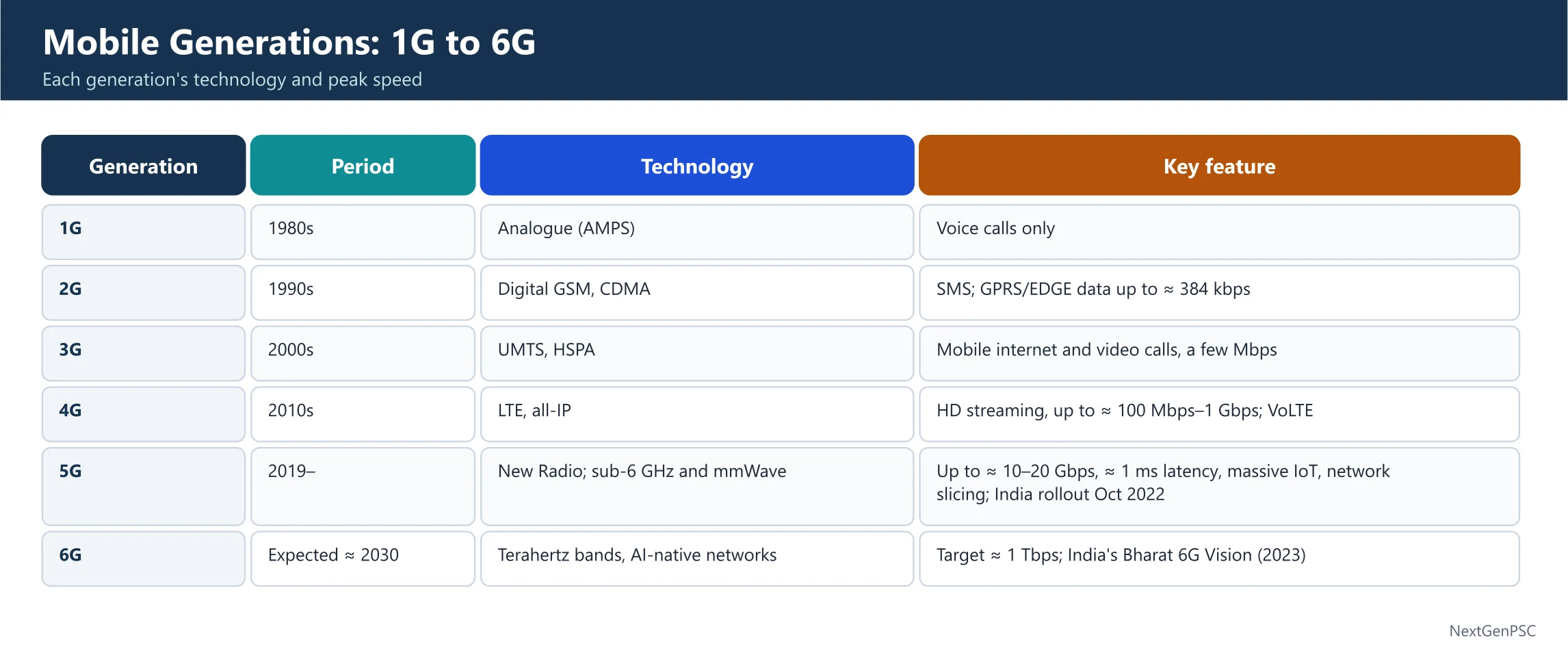
1. The Timeline of Generations
Each decade has brought a new 'G' (Generation), significantly upgrading how we connect.
1G (1980s): The Analog Era. It supported only voice calls with poor quality and zero security.
2G (1990s): The Digital Revolution. Introduced SMS (texting) and basic data (GPRS). Used GSM and CDMA standards.
3G (2000s): The Mobile Internet Era. Enabled video calling and web browsing on the move.
4G (2010s): The Data Era (LTE). Optimized for HD streaming and the 'App Economy'.
5G (2020s): The Connected Era. Ultra-low latency and Massive IoT (connecting billions of devices).
2. 6G: The Next Horizon (2030+)
6G is not just about faster speed; it is about 'presence' and 'intelligence'.
Terahertz Frequencies: 6G will operate at frequencies between 100 GHz and 10 THz. These waves carry massive amounts of data but are easily blocked by obstacles.
Microsecond Latency: While 5G aimed for 1 millisecond, 6G targets 1 microsecond (0.000001 seconds), enabling real-time remote surgery and holographic telepresence.
AI-Native Network: Unlike 5G where AI is an 'add-on', 6G is designed with AI at its core. The network will use AI to self-optimize and decide where to process data (Edge vs. Cloud) autonomously.
3. New Use Cases for 6G
Holographic Presence: Imagine 'projecting' a 3D life-sized version of yourself into a meeting thousands of miles away.
Location Awareness: Moving from 'meter-level' to 'centimeter-level' accuracy for indoor navigation and autonomous robots.
Integrated Sensing: The network itself acts as a radar, being able to 'sense' the movement and shape of objects even without a camera.
| Feature | 4G | 5G | 6G (Goal) |
|---|---|---|---|
| Peak Speed | 1 Gbps | 10-20 Gbps | 100 Gbps - 1 Tbps |
| Latency | 30-50 ms | 1-10 ms | < 1 microsecond |
| Spectrum | Sub 6 GHz | mmWave (up to 100 GHz) | Terahertz (100 GHz - 10 THz) |
| Primary Tech | Digital Voice/Data | Massive MIMO / IoT | AI-Native / Sensing |
Prelims tips
- Latency: The time delay in data transfer. 6G target is 1 microsecond.
- THz (Terahertz): The frequency band for 6G (0.1 to 10 THz).
- Sensing: 6G's ability to act as a radar to detect physical objects.
- B5G (Beyond 5G): A term often used for the transitional research leading to 6G.
Mains points
- The Digital Divide: While 6G offers extreme performance, there is a risk it will only benefit urban, high-tech hubs, leaving rural areas further behind unless Satellite-Cellular integration is prioritized.
- Strategic Autonomy: Countries are racing to set 6G standards early (standardization expected by 2028-2030) to secure a competitive edge in the global tech market.
- Sustainability: 6G is being designed to be 'Energy-Efficient by Design', using AI to put parts of the network to 'sleep' when not in use to reduce its carbon footprint.
- Cybersecurity: With AI managing the network, 6G will face new threats like Adversarial AI, requiring quantum-resistant encryption to protect trillions of connected sensors.
Did you know?
- While 5G connects 'things' to the internet, 6G aims to connect human senses (tactile/smell) to the digital world.
- 6G signals behave more like light than radio waves, which is why they will need millions of 'tiny cells' on every street light and building.
- Japan, South Korea, and China are already investing billions in 6G research, with patents already being filed for 'space-air-ground' integrated networks.
Short-Range Wireless & Wearable Tech: Connecting the Personal Space
Wearable Technology and short-range wireless protocols like Bluetooth, NFC, and RFID form the core of the 'Personal IoT.' While they all use radio waves, they differ in frequency, power usage, and range—ranging from the 100m reach of Bluetooth to the millimeter-level contact required for NFC.
1. Wearable Technology (Wearables)
Wearables are electronic devices designed to be worn on the body. They act as the 'bridge' between our physical activities and digital data.
Forms: Accessories (watches), smart clothing, medical implants, or even Electronic Tattoos.
Function: These are hands-free IoT devices. They collect biometric data (heart rate, steps) and transmit it to a smartphone or the cloud for analysis.
2. RFID: The Digital Tag
Radio Frequency Identification (RFID) uses electromagnetic fields to automatically identify and track tags attached to objects.
The Tag: Contains a microchip and an antenna. In malls, these prevent theft; in logistics, they track cargo.
Passive Tags: Most tags have no battery. They 'wake up' only when they receive a radio signal from a reader.
3. Bluetooth: The Data Connector
Bluetooth is designed for short-distance, continuous data exchange between devices.
Frequency: Operates in the 2400-2483.5 MHz range (2.4 GHz band).
Range: Usually up to 100 meters (Class 1).
BLE (Bluetooth Low Energy): A newer version used in wearables that consumes very little power by staying 'asleep' until a data spurt is needed.
4. NFC: The 'Tap-and-Go' Tech
Near Field Communication (NFC) is a specialized subset of RFID meant for extremely close distances.
Principle: Works on Magnetic Induction. When two NFC coils are close, one powers the other.
Specs: Transmits at 13.56 MHz with a max speed of 424 kbps. It is slower than Bluetooth but connects much faster (less than 0.1 seconds).
Security: Because the range is tiny (usually < 4cm), it is much harder for hackers to intercept, making it perfect for Contactless Payments.
| Feature | Bluetooth | NFC | RFID |
|---|---|---|---|
| Frequency | 2.4 GHz | 13.56 MHz | Various (LF, HF, UHF) |
| Range | Up to 100m | < 10cm (Tap) | Up to 100m+ (Active) |
| Setup Time | < 6 seconds | < 0.1 seconds | < 0.1 seconds |
| Data Speed | High (up to 2 Mbps) | Low (424 kbps) | Low |
| Main Use | Audio/File transfer | Payments/Access cards | Inventory/Logistics |
Prelims tips
- Induction: The physics principle behind NFC communication.
- Frequency of NFC: 13.56 MHz (Commonly asked).
- Passive vs Active RFID: Passive tags have no power source; Active tags have a battery.
- IoT Foundation: Wearables are considered a major component of the Consumer Internet of Things.
Mains points
- Digital Payments Revolution: NFC-enabled smartphones and cards are driving the shift toward a cashless economy, improving transaction speed and security in India (e.g., Tap-to-Pay).
- Privacy and Surveillance: As wearables track location and health data 24/7, concerns regarding 'Data Sovereignty' and who owns this intimate information have become critical policy debates.
- Healthcare Impact: In aging societies, wearables with 'fall detection' or 'ECG monitoring' can save lives by automatically alerting emergency services via IoT networks.
- Industrial Efficiency: RFID technology is the backbone of modern logistics (like FASTag in India), reducing toll booth congestion and automating supply chains.
Did you know?
- The name 'Bluetooth' comes from a 10th-century Viking King, Harald 'Bluetooth' Gormsson, who united Scandinavia—just as the tech unites devices!
- NFC is so low-power that an NFC tag can work for years without a battery, drawing all the energy it needs from your smartphone's magnetic field during the 'tap'.
- Smart 'tattoos' are being developed that can monitor glucose levels in diabetic patients and change color to alert the user.
Artificial Intelligence: The Silicon Mind
Artificial Intelligence (AI) is the science of making machines mimic human cognitive functions. Coined by John McCarthy in 1956, AI has evolved from simple algorithms to complex Neural Networks that can perceive, learn, and solve problems, transforming from a laboratory experiment into the invisible engine of our daily digital lives.
1. What is AI?
At its core, AI is about 'training' computers to handle tasks that usually require a human brain—like recognizing a face in a photo or understanding a spoken command.
The Origin: John McCarthy introduced the term at the Dartmouth Conference in 1956.
Cognitive Abilities: AI systems perform tasks like Perceiving (seeing/hearing), Learning (improving from data), and Decision Making.
The Toolkit: It uses technologies like pattern recognition, big data, and self-improving algorithms.
2. The Hierarchy: AI, ML, and DL
People often use these terms interchangeably, but they are nested layers of technology.
Machine Learning (ML): A subset of AI where machines learn from data patterns to make predictions without being 'hard-coded'. Example: An email filter learning which words look like 'spam'.
Deep Learning (DL): A subset of ML that uses Artificial Neural Networks to imitate the human brain. It is 'Deep' because it has many layers of processing. It excels at unstructured data like images and voice.
3. AI in Everyday Life
Smart Assistants: Siri and Alexa use Natural Language Processing (NLP) to understand you.
Recommendation Engines: Netflix and YouTube analyze your past behavior to predict what you'll enjoy next.
Autonomous Systems: Self-driving cars process millions of data points per second to navigate safely.
| Feature | Machine Learning (ML) | Deep Learning (DL) |
|---|---|---|
| Data requirement | Can work with smaller data sets | Requires massive amounts of data |
| Hardware | Can run on standard CPUs | Requires high-end GPUs/TPUs |
| Learning Method | Requires manual feature labeling | Learns features automatically (Unsupervised) |
| Complexity | Linear/Simple algorithms | Complex 'Neural' layers (Brain-like) |
Prelims tips
- John McCarthy: The Father of AI.
- Neural Networks: The fundamental architecture used in Deep Learning.
- Turing Test: A test developed by Alan Turing to see if a machine can exhibit intelligent behavior equivalent to a human.
- Big Data: The fuel that powers modern AI systems.
Mains points
- Ethical AI: As AI makes decisions (like hiring or loan approvals), the risk of 'Algorithmic Bias' (reflecting human prejudices) is a major concern for policymakers.
- Job Displacement: While AI creates new 'high-tech' roles, it poses a significant threat to routine manual and cognitive jobs, necessitating a focus on 're-skilling'.
- India's AI Strategy: NITI Aayog’s #AIforAll strategy focuses on leveraging AI for social inclusion, healthcare, and agriculture in India.
- Governance: The debate between Innovation vs. Regulation (like the EU AI Act) is shaping how global powers control the growth of AI.
Did you know?
- In 1997, an AI named Deep Blue defeated world chess champion Garry Kasparov, marking a huge milestone in AI history.
- The 'Deep' in Deep Learning refers to the number of layers in a neural network; some modern networks have hundreds of layers!
- AI can now create art, write poetry, and even compose music that is indistinguishable from human-made work (Generative AI).
The Internet of Things (IoT): The Global Neural Network
The Internet of Things (IoT) is a massive network where everyday objects—from refrigerators to industrial turbines—are given a 'digital voice.' By embedding these objects with sensors and software, they can 'talk' to each other and to us, creating a smarter, more responsive world.
1. How IoT Works
IoT bridges the gap between the physical and digital worlds using four key components.
Sensors/Devices: These collect data from the environment (e.g., a thermostat sensing room temperature).
Connectivity: The data is sent to the cloud via Wi-Fi, Bluetooth, or Cellular networks (4G/5G).
Data Processing: Once the data hits the cloud, software analyzes it (e.g., deciding if the temperature is too high).
User Interface: The information is made useful to the user (e.g., an alert on your phone or automatically turning on the AC).
2. Ordinary to Extraordinary
IoT isn't just about 'Smart Homes'; it spans across every sector of the economy.
Consumer IoT: Smartwatches, connected light bulbs, and smart security cameras.
Industrial IoT (IIoT): Sensors on factory machines that predict when a part will break before it actually does ( Predictive Maintenance ).
Smart Cities: Trash cans that tell the city when they are full, or streetlights that dim when no one is around to save energy.
3. The Exponential Growth
We have already passed the point where there are more 'connected things' than 'connected people' on Earth.
10 Billion+: The current estimated number of active IoT devices.
22 Billion by 2025: The projected growth as 5G makes it easier to connect thousands of devices in a small area.
| Sector | IoT Application | Benefit |
|---|---|---|
| Healthcare | Wearable heart monitors | Real-time patient tracking |
| Agriculture | Soil moisture sensors | Precision irrigation / Water saving |
| Retail | Smart Shelves / RFID | Automatic inventory management |
| Manufacturing | Sensor-tracked assembly lines | Increased safety and efficiency |
Prelims tips
- Edge Computing: A trend in IoT where data is processed locally (near the device) rather than in a far-away cloud to save time/bandwidth.
- IPv6: The internet addressing system that provides enough 'IP addresses' for trillions of IoT devices to have their own unique identity.
- Industrial IoT (IIoT): Also known as Industry 4.0.
- LPWAN: Low-Power Wide-Area Network—a type of wireless network specifically for IoT devices that need to send small amounts of data over long distances with long battery life.
Mains points
- Cybersecurity & Privacy: With billions of devices collecting personal data, every smart device is a potential 'door' for hackers. Securing the IoT Ecosystem is a top national security priority.
- Standardization: One major challenge is that devices from different manufacturers often can't 'talk' to each other, creating a fragmented network.
- India's Smart Cities Mission: Leveraging IoT for urban management, water distribution, and traffic control is central to India's modernization goals.
- E-Waste: The rapid growth of IoT devices, many with non-replaceable batteries, contributes significantly to the global electronic waste problem.
Did you know?
- The first-ever IoT device was a Coca-Cola vending machine at Carnegie Mellon University in the early 1980s. Programmers connected it to the internet so they could check if the machine was empty before walking to it!
- The 'Thing' in IoT can even be a farm animal; some cows are now fitted with sensors to track their health and fertility.
- By 2025, it is estimated that IoT devices will generate 79.4 zettabytes of data. For context, 1 zettabyte is equal to a trillion gigabytes!
Generative AI: The Creative Frontier
While Traditional AI is built to analyze and categorize existing data, Generative AI is designed to create entirely new content. By learning the underlying patterns of human language, art, and code, it can generate original text, images, and audio that feel human-made.
1. What is Generative AI?
Generative AI refers to a category of AI that can produce new data. It doesn't just 'find' an answer; it 'builds' one.
Large Language Models (LLMs): These are the brains behind ChatGPT. They are trained on massive datasets (like the entire internet) to predict the next word in a sequence.
Diffusion Models: These power image generators like Midjourney or DALL-E. They start with 'random noise' and refine it until a clear, original image emerges based on your text prompt.
2. How it Differs from Traditional AI
The difference lies in the 'output'.
Discriminative (Traditional): This AI is a critic. It looks at a photo and says, 'This is a cat.' It classifies and predicts based on existing labels.
Generative: This AI is an artist. You tell it, 'Draw a cat wearing a space suit,' and it creates an image that never existed before.
| Feature | Traditional AI | Generative AI |
|---|---|---|
| Core Function | Analyze, Classify, Predict | Create, Synthesize, Design |
| Primary Output | Numerical data, Labels, Categories | Text, Images, Video, Audio, Code |
| Human Interaction | Limited (Filtering, Sorting) | Conversational and Collaborative |
| Example | Spam filters, Face Unlock | ChatGPT, Gemini, Midjourney |
Prelims tips
- Transformer Architecture: The foundation of modern Generative AI.
- Prompt Engineering: The art of writing specific instructions to get the best output from a Generative AI.
- Turing Test: Generative AI has brought us closer than ever to passing this test of machine intelligence.
- Neural Networks: Specifically, GANs (Generative Adversarial Networks) were the early leaders in this field.
Mains points
- Intellectual Property (IP): Who owns the copyright for AI-generated art or text? This is a massive legal debate globally.
- Deepfakes & Misinformation: Generative AI makes it easy to create realistic but fake videos/audio of people, posing a threat to democracy and social trust.
- Economic Impact: It is expected to automate creative tasks, potentially displacing graphic designers and writers while creating 'Prompt Engineer' roles.
- Responsible AI: Governments are rushing to regulate 'Foundation Models' to ensure they don't produce harmful instructions (like how to build a weapon).
Did you know?
- Generative AI can sometimes 'hallucinate'—this means it confidently provides information that is completely made up or factually incorrect.
- The 'T' in ChatGPT stands for Transformer, a type of neural network architecture invented by Google researchers in 2017.
- Generative AI passed a simulated Bar Exam (for lawyers) in the top 10% of test-takers, showing its immense reasoning potential.
Computer Malware: The Digital Parasites
Malware, short for Malicious Software, is any code or program designed to infiltrate, damage, or hijack a computer system without the user's consent. Unlike helpful software that follows your instructions, malware works against you—stealing data, spying on your activities, or even locking your files for ransom.
1. What is Malware?
Software is a set of instructions that tells hardware what to do. Malware is simply bad instructions disguised as regular files or code.
Deployment: It can be sent remotely from anywhere in the world, making the source extremely difficult to track.
Forms: It can hide in executable files (.exe), scripts, active web content, or even third-party plugins.
2. Common Types of Malware
Malware is an umbrella term for several distinct digital threats:
Virus: Attaches itself to a clean file and spreads when the file is opened. It needs human action to move.
Worm: Unlike a virus, a worm is self-replicating. It spreads across networks automatically without any help from the user.
Trojan Horse: Disguises itself as useful software (like a free game) but contains a hidden 'trapdoor' to let hackers in.
Ransomware: Encrypts (locks) your data and demands a payment (ransom) to give you the key.
Spyware/Adware: Secretly monitors your typing (keylogging) or floods you with unwanted advertisements.
3. How Malware Infiltrates Your System
Hackers use various 'entry points' to bypass your security.
Phishing Emails: Deceptive emails with infected attachments or links.
Storage Media: Infected USB drives or mobile devices plugged into a clean computer.
Outdated Software: 'Vulnerabilities' in old software that haven't been patched by the manufacturer.
Pop-ups & Malicious Sites: Clicking on 'You have won a prize!' or downloading from unverified P2P file-sharing networks.
| Malware Type | How it Spreads | Human Action Required? |
|---|---|---|
| Virus | Attaches to a host file | Yes (Opening the file) |
| Worm | Travels through network gaps | No (Self-replicating) |
| Trojan | Disguises as legitimate software | Yes (Downloading/Installing) |
| Spyware | Installed alongside other software | Yes (Often bundled) |
Prelims tips
- Encryption: The tool used by Ransomware to lock files.
- Social Engineering: The psychological tricking of users into clicking malicious links (Phishing).
- Zero-day Vulnerability: A security hole in software that is unknown to the vendor and is exploited by malware.
- Antivirus vs Firewall: Antivirus scans for known malware; a Firewall acts as a barrier for incoming network traffic.
Mains points
- National Security: State-sponsored malware (like Stuxnet) can be used as a 'Cyber Weapon' to sabotage a country's critical infrastructure like power plants.
- The Human Link: Despite advanced firewalls, 'Human Error' remains the biggest reason for malware infections, highlighting the need for Digital Literacy.
- Dark Web Economy: Malware-as-a-Service (MaaS) allows even non-technical criminals to rent ransomware kits on the dark web, increasing the frequency of attacks.
- Legal Framework: India's Information Technology Act, 2000 (specifically Sections 43 and 66) provides the legal basis for prosecuting those who deploy malware.
Did you know?
- The first computer virus for MS-DOS, called 'Brain', was created in 1986 by two brothers from Pakistan—not to steal data, but to track software piracy!
- The WannaCry ransomware in 2017 affected over 200,000 computers in 150 countries, causing billions of dollars in damages.
- Most modern malware is created by professional 'Cyber-Cartels' rather than individual teenagers in basements.
Display Technologies: From LCD to AMOLED and E-Paper
Display technology has evolved from power-heavy LCDs with single backlights to AMOLED screens where every pixel is its own light source. While AMOLED excels in vibrant colors and deep blacks, E-Paper mimics physical ink, relying on reflected light rather than emitted light for a paper-like reading experience.
1. The Traditional LCD & LED TV
Liquid Crystal Displays (LCDs) do not create their own light; they act as valves for a light source behind them.
The Backlight: Standard LCDs use one large, energy-consuming backlight. Because the light is always 'on' behind the screen, it is hard to achieve true black (it usually looks dark grey).
The LED Upgrade: LED TVs are just LCDs that use small LED bulbs for backlighting. These can be placed behind the panel (Full Array) or on the sides (Edge-lit), allowing for thinner designs.
2. OLED & AMOLED: Self-Lighting Pixels
Organic Light-Emitting Diodes (OLED) represent a shift where pixels are 'emissive' (they create their own light).
Individual Control: Every single pixel can be switched on or off. To show 'black,' the pixel simply turns off completely, saving power and creating infinite contrast.
AMOLED (Active-Matrix OLED): Adds a Thin Film Transistor (TFT) layer. This matrix acts like a switchboard, quickly telling each pixel exactly when to turn on. This results in faster refresh rates, making it perfect for high-definition video.
Super AMOLED: A Samsung-developed tech that integrates the touch-sensor layer directly into the screen, making it even thinner and brighter.
3. Electronic Paper (E-Paper)
E-paper is designed specifically to mimic the experience of reading a physical book.
Reflective vs. Emissive: Unlike LCD/OLED which emit light (shining it into your eyes), E-paper reflects ambient light from the room or sun, just like real paper.
Sunlight Readability: Because it doesn't fight the sun with its own brightness, it becomes clearer in direct sunlight, whereas phone screens often fade.
Low Power: It only consumes power when you 'flip a page' (change the image). Once the image is set, it stays there without using any electricity.
| Feature | LCD/LED | AMOLED | E-Paper |
|---|---|---|---|
| Light Source | External Backlight | Self-emissive pixels | Reflected Ambient Light |
| Contrast | Lower (Greyish blacks) | Infinite (True blacks) | High (Black ink on grey/white) |
| Power Use | High (Backlight always on) | Medium (Depends on brightness) | Ultra-Low (Only uses power to change image) |
| Best Use | Budget TVs/Monitors | High-end Phones/TVs | E-readers (Kindle) |
Prelims tips
- TFT (Thin Film Transistor): The technology behind the 'Active Matrix' in AMOLED.
- Infinite Contrast: A term associated with OLED/AMOLED because black pixels emit zero light (0 nits).
- Reflective Display: The defining characteristic of E-paper.
- Refresh Rate: AMOLED has a much higher refresh rate than E-paper, making E-paper unsuitable for videos.
- AR, VR, MR and XR: Virtual Reality (VR) places the user in a fully digital world and shuts out the real one (headsets like Meta Quest); Augmented Reality (AR) overlays digital objects on the real world (Pokémon GO, Snapchat filters, Google Lens); Mixed Reality (MR) lets digital objects interact with the real scene (Microsoft HoloLens, Apple Vision Pro); Extended Reality (XR) is the umbrella term for all three.
- Metaverse: a persistent, shared 3-D virtual space where people interact through avatars, built on VR/AR, blockchain (digital ownership, NFTs) and high-speed networks; the term comes from Neal Stephenson's 1992 novel 'Snow Crash'.
Mains points
- Energy Sustainability: As global electricity consumption by electronics rises, the shift toward emissive (OLED) and reflective (E-paper) displays helps reduce the carbon footprint of devices.
- Health and Eye Strain: The 'Blue Light' emitted by LCD and AMOLED screens is linked to sleep disruption, driving the demand for E-paper in educational devices to protect student vision.
- Manufacturing Challenges: OLED panels are harder to manufacture than LCDs and are sensitive to water/oxygen, which is why high-end TVs remain expensive.
- Future - MicroLED: The next frontier that combines the self-emissive nature of OLED with the durability and high brightness of traditional LEDs, potentially replacing both.
Did you know?
- AMOLED screens are why 'Dark Mode' on your phone actually saves battery—the black parts of the screen are literally powered off!
- E-paper was inspired by the way light reflects off a real bird's feathers or a printed newspaper.
- The 'Active Matrix' in AMOLED is what allows large screens (like 65-inch TVs) to update fast enough for gaming; without it, the screen would be a blurry mess.
The Three Layers of the Web: Surface, Deep, and Dark
The internet is like an iceberg. The Open Web is just the visible tip that search engines can see. Below it lies the massive Deep Web (private data) and the secretive Dark Web, which requires special tools like Tor to access. While often associated with crime, the Dark Web is also a vital tool for Privacy and Whistleblowing.
1. Defining the Layers
To understand the Dark Web, we must first categorize the entire internet into three distinct zones.
Surface Web (Open Web): This is what you use every day. Sites indexed by Google, Bing, or Yahoo (e.g., Wikipedia, News sites). It makes up only about 4-5% of the total internet.
Deep Web: This consists of data behind firewalls or login screens. It includes your private emails, bank statements, and medical records. It is not 'hidden' for illegal reasons, but for privacy.
Dark Web: A small portion of the Deep Web that is intentionally hidden. It uses encrypted networks and cannot be found using standard browsers like Chrome.
2. How the Dark Web Functions
The Dark Web relies on 'Overlay Networks' that hide your identity and location.
Specialized Software: You need tools like The Onion Router (Tor) or I2P. Tor works by peeling away layers of encryption (like an onion) through different servers globally.
Anonymity: Users' IP addresses are masked, making it nearly impossible for authorities or websites to know who you are or where you are browsing from.
3. The Dual Nature of the Dark Web
The Dark Net is a double-edged sword, serving both noble and criminal purposes.
Positive Use (Privacy & Freedom): Dissidents in oppressive regimes use it to communicate without fear of Political Reprisals. Whistleblowers use it to leak classified info to journalists.
Negative Use (Cybercrime): It hosts 'Shadow Markets' for selling drugs, stolen data, and weapons. It is also a hub for hacking tools, phishing kits, and illicit services.
Censorship Circumvention: It allows people to bypass restrictive government firewalls and content-filtering systems.
| Feature | Surface Web | Dark Web |
|---|---|---|
| Accessibility | Common browsers (Chrome, Safari) | Specialized software (Tor, I2P) |
| Indexing | Indexed by Search Engines | Not indexed / Hidden |
| User Identity | Trackable via IP address | Anonymous / Encrypted |
| Content | Publicly available info | Restricted / Illicit / Private |
| Total Size | Approx. 4-5% | Small but growing |
Prelims tips
- Tor & I2P: Key software used to access the Dark Net.
- Encryption: The fundamental technology that hides Dark Web traffic.
- Deep Web vs Dark Web: Remember, your bank account is Deep Web, not Dark Web. All Dark Web is Deep Web, but not all Deep Web is Dark Web.
- Whistleblowing: Platforms like SecureDrop use the Dark Web to protect sources.
Mains points
- Mass Surveillance: In a world of increasing digital footprints, the Dark Web represents a 'Free Zone' for privacy-conscious citizens, raising debates on the Right to Anonymity.
- State Security Challenges: Tracking criminals on the Dark Net is a nightmare for law enforcement (like India's NCB or CERT-In) due to end-to-end encryption and international jurisdiction issues.
- Cyber Warfare: State actors often use the Dark Net to recruit hackers or buy 'Zero-day exploits' to attack rival nations' critical infrastructure.
- Social Impact: While it facilitates crime, it also allows journalists in war zones or restrictive regimes to bypass Network Censorship and report the truth to the world.
Did you know?
- The Tor project was originally developed by the U.S. Navy to protect government communications—the same technology now used to hide criminal activity!
- Dark Web URLs don't end in .com or .org; they usually end in .onion and consist of a random string of letters and numbers.
- The most famous Dark Web marketplace was the Silk Road, which was shut down by the FBI in 2013.
Big Data: The Giant Library of the Digital Age
Big Data refers to datasets so massive and complex that traditional software cannot process them. It is characterized by the Three Vs: Volume, Velocity, and Variety. In India, Big Data is the driving force behind modern policymaking, helping the government move from 'guesswork' to Evidence-Based Governance.
1. The Three Vs of Big Data
To qualify as 'Big Data,' a dataset must generally hit three specific characteristics.
Volume: The sheer amount of data. We are talking about Terabytes and Petabytes of information generated from social media, sensors, and transactions.
Velocity: The speed at which data is generated. Think of millions of tweets per minute or real-time GPS data from Uber cars.
Variety: Data comes in all formats. It’s not just neat tables (Structured); it's also emails, videos, PDFs, and audio recordings (Unstructured).
2. Why Traditional Software Fails
Traditional databases (like simple Excel sheets or SQL) are like small buckets. Big Data is like a waterfall. You need Distributed Computing (many computers working as one) and specialized tools like Hadoop or Spark to store and analyze it.
3. Big Data in the Indian Context
With over 1.4 billion people, India is a 'Data Goldmine.'
Evidence-Based Policy: NITI Aayog is using Big Data to track the success of government schemes in real-time, allowing for better allocation of funds.
Power Sector (Discoms): Electricity companies use data from 'last-mile sensors' on transformers to identify exactly where power theft or technical leakage is happening, reducing massive commercial losses.
Economic Growth: NASSCOM predicts the Indian analytics industry will reach $16 billion by 2025, creating millions of jobs in data science.
| Feature | Traditional Data | Big Data |
|---|---|---|
| Size | Gigabytes (GB) | Petabytes / Exabytes |
| Format | Structured (Rows/Columns) | Semi-structured & Unstructured |
| Processing | Centralized (Single computer) | Distributed (Network of computers) |
| Source | Business transactions | Social media, Sensors, IoT, Logs |
Prelims tips
- The 3 Vs: Volume, Velocity, Variety (Standard UPSC/State PSC question).
- NITI Aayog: The nodal body pushing for Big Data in Indian governance.
- Unstructured Data: Video, Audio, and Social Media posts (Traditional software can't handle this).
- Analytic Industry: Remember the $16 Billion forecast by NASSCOM.
Mains points
- Governance & Welfare: Big Data helps in identifying 'ghost beneficiaries' in schemes like MGNREGA or PDS, ensuring that subsidies reach the right people.
- Health Transformation: By analyzing massive patient datasets, India can predict the outbreak of diseases (like Dengue or Malaria) and prepare the healthcare system in advance.
- Privacy Concerns: The collection of such massive data raises 'Big Brother' concerns. The implementation of the Digital Personal Data Protection Act (2023) is crucial to balance innovation with privacy.
- Infrastructure Bottleneck: For India to fully utilize Big Data, it needs massive investment in Data Centers and high-speed 5G/6G connectivity in rural areas.
Did you know?
- Every day, humans generate roughly 2.5 quintillion bytes of data. That's enough to fill 10 million Blu-ray discs, which stacked up, would be as tall as two Eiffel Towers!
- The 'Fourth V' often added by experts is Veracity, which refers to the 'truthfulness' or quality of the data.
- Big Data analysis is how Amazon knows what you want to buy before you even search for it, and how Google Maps predicts traffic jams.
Data Centers and Cloud Computing: The Digital Foundations
If Big Data is the 'oil' of the digital age, Data Centers are the refineries and Cloud Computing is the pipeline that delivers it to your device. Together, they allow businesses and individuals to store and process massive amounts of information without needing expensive hardware at home or in the office.
1. Data Centers: The Physical Heart
A Data Center is a physical facility that houses a large group of networked computer servers used for the remote storage, processing, or distribution of large amounts of data.
Infrastructure: They contain thousands of servers, high-speed networking equipment, and massive storage drives (HDDs and SSDs).
Cooling & Power: Because thousands of computers generate immense heat, data centers require sophisticated liquid cooling or HVAC systems and 100% redundant power supplies (UPS and generators).
Security: They feature high-level physical security (biometrics, guards) and digital security (firewalls) to protect the world's most sensitive data.
2. Cloud Computing: The Virtual Service
Cloud computing is the on-demand delivery of computing power, database storage, and applications over the internet with pay-as-you-go pricing.
IaaS (Infrastructure as a Service): Renting the raw hardware (servers/storage). Example: Amazon Web Services (AWS).
PaaS (Platform as a Service): Tools for developers to build apps without worrying about the hardware. Example: Google App Engine.
SaaS (Software as a Service): Ready-to-use software accessed via a browser. Example: Google Drive, Microsoft 365, or Netflix.
3. The Relationship with Big Data
Big Data needs the Scalability of the cloud. If you suddenly get a million new users, the cloud allows you to 'spin up' new servers in seconds. This is called Elasticity .
| Model | Full Form | Who is it for? | Example |
|---|---|---|---|
| IaaS | Infrastructure as a Service | IT Administrators | AWS, Microsoft Azure |
| PaaS | Platform as a Service | Software Developers | Heroku, Google App Engine |
| SaaS | Software as a Service | End Users | Gmail, Salesforce, Slack |
Prelims tips
- SaaS vs PaaS vs IaaS: This is a high-probability question for UPSC/PSC. Remember: SaaS = Use it, PaaS = Build on it, IaaS = Rent it.
- Edge Computing: Processing data near the source (like an IoT device) rather than in a central cloud data center.
- Public vs Private vs Hybrid Cloud: Public is shared (AWS), Private is dedicated to one company, Hybrid is a mix of both.
- Hyperscale Data Centers: Massive facilities (usually 5,000+ servers) operated by giants like Google or Meta.
Mains points
- Data Localization: The Indian government's push for Data Sovereignty requires that sensitive personal data of Indians be stored in data centers located within India.
- Energy Footprint: Data centers are major carbon emitters. There is a growing movement toward Green Data Centers powered by renewable energy like solar and wind.
- Economic Opportunity: India is becoming a global hub for data centers due to its favorable geography, cheap power (in some zones), and massive digital consumer base.
- Security Risks: Centralizing data in the cloud makes it a 'single point of failure.' If a major cloud provider goes down, millions of businesses can be paralyzed instantly.
Did you know?
- Some companies like Microsoft have experimented with placing data centers underwater to use the cold ocean water for natural cooling!
- A typical large-scale data center uses as much electricity as 80,000 households.
- The term 'Cloud' comes from the way engineers used to draw the internet as a fluffy cloud in network diagrams during the 1990s.
Cloud and Edge Computing: The Digital Atmosphere
Cloud Computing allows us to rent powerful computers over the internet, while Edge Computing brings that processing power closer to the user to eliminate delays. Together, they form a hierarchy of intelligence—the Cloud handles the massive processing, and the Edge handles the split-second decisions.
1. Cloud Computing: On-Demand Power
Cloud computing is the delivery of various services—like servers, storage, and software—over the internet. Think of it as a utility, like electricity; you use it when you need it and pay only for what you consume.
No Active Management: Users don't need to worry about the physical hardware or the temperature of the server room; the provider (like Amazon or Google) handles it.
Scalability: If your business grows overnight, you can increase your storage or speed with one click. This is called 'flexible resources.'
Economies of Scale: Because cloud providers serve millions of customers, they can buy hardware in bulk and offer services much cheaper than if you bought your own server.
2. Edge Computing: The Power of Proximity
As we move toward self-driving cars and real-time AI, waiting for data to travel to a far-away cloud data center and back takes too long. This delay is called Latency .
Local Processing: Edge computing moves the 'brain' to the periphery (edge) of the network—like inside a smart camera, a factory sensor, or a local neighborhood server.
Real-Time Analysis: Data is analyzed instantly where it is created. For example, a self-driving car must process 'Stop' signs at the Edge because waiting for the Cloud could cause an accident.
Bandwidth Saving: Instead of sending 24/7 raw video footage to the cloud, an Edge camera can analyze the video locally and only send an 'Alert' to the cloud when it sees something important.
3. Cloud vs. Edge: A Partnership
It is not an 'either-or' situation. They work together in a structured flow.
Edge: For immediate, real-time actions (Short-term memory).
Cloud: For deep learning, long-term storage, and heavy data crunching (Long-term memory).
| Feature | Cloud Computing | Edge Computing |
|---|---|---|
| Processing Location | Centralized Data Centers (often far away) | Local (on device or nearby server) |
| Latency (Delay) | Higher (milliseconds to seconds) | Ultra-low (microseconds) |
| Bandwidth Use | High (all data sent to cloud) | Low (only summary data sent) |
| Ideal Use Case | Big data analysis, Backups | Autonomous cars, Real-time IoT |
Prelims tips
- Latency: The time it takes for data to travel. Reducing this is the #1 goal of Edge Computing.
- Disaster Recovery: A major cloud advantage where data is mirrored across multiple global locations.
- 5G and Edge: 5G technology is the biggest enabler of Edge Computing because it provides the speed needed for local devices to communicate.
- Distributed Architecture: The technical term for how Edge computing spreads out the workload.
Mains points
- Data Sovereignty: Cloud computing raises issues of where data is physically stored. India's policies push for local data centers to ensure Digital Sovereignty.
- Security Trade-offs: While centralized cloud is easier to secure, a single breach can expose millions. Edge computing spreads the risk but makes managing thousands of local nodes difficult.
- Energy Efficiency: Edge computing reduces the need for massive data transfers across the globe, potentially lowering the overall energy footprint of the internet.
- Self-Reliance: For India, developing an indigenous Edge-Cloud ecosystem is vital for the success of missions like Smart Cities and Industry 4.0.
Did you know?
- The Cloud isn't actually in the sky—it's mostly in giant, windowless buildings and under the ocean in fiber-optic cables!
- By 2025, it is estimated that 75% of enterprise-generated data will be created and processed outside a traditional centralized data center (meaning at the Edge).
- Smart speakers like Alexa use both: they recognize your 'Wake Word' (Edge) but process your complex question in the Cloud.
Quantum Computing: The Ultimate Leap
While classical computers use Bits (0 or 1), Quantum Computers use Qubits. By leveraging the strange laws of quantum physics, these machines can exist in multiple states at once, allowing them to solve problems in seconds that would take today's fastest supercomputers thousands of years.
1. The Power of the Qubit
In a classical computer, a switch is either ON or OFF. In the quantum world, things are more 'fluid.'
Superposition: A Qubit can be a 0, a 1, or both at the same time. This allows a quantum computer to test millions of possibilities simultaneously.
Entanglement: Two qubits can be 'linked' such that the state of one instantly influences the other, even if they are miles apart. This creates massive processing shortcuts.
2. Redefining Cloud and Edge
Quantum computing won't replace your phone; it will act as a 'Super-Engine' for the Cloud.
Quantum-as-a-Service (QaaS): Because quantum computers are extremely sensitive (requiring near absolute zero temperatures), they will be housed in central labs and accessed via the Cloud.
Edge Security: Quantum computers will be able to crack almost all current encryption. This forces the 'Edge' to adopt Post-Quantum Cryptography to keep data safe.
3. Real-World Applications
Drug Discovery: Simulating how molecules interact at an atomic level to find cures for diseases like Alzheimer’s.
Optimization: Solving the 'Traveling Salesman' problem for global logistics—finding the perfect route for thousands of trucks instantly.
Material Science: Creating new materials like superconductors that work at room temperature or batteries that last for weeks.
| Feature | Classical Computer | Quantum Computer |
|---|---|---|
| Basic Unit | Bit (0 or 1) | Qubit (0, 1, or both) |
| Processing | Linear (One by one) | Parallel (All at once) |
| Error Rate | Very Low | High (Decoherence) |
| Environment | Room temperature | Near Absolute Zero (colder than space) |
Prelims tips
- Superposition & Entanglement: The two key principles of Quantum Computing.
- Qubits: The basic unit of quantum information.
- Absolute Zero: The temperature ($0$ Kelvin or $-273.15$°C) required for many quantum systems.
- Quantum Mission: India has launched the National Quantum Mission (NQM) to develop 50-1000 physical qubits in the next 8 years.
Mains points
- The Cryptography Crisis: Quantum computers pose an existential threat to blockchain and banking. Developing Quantum-Resistant Algorithms is a matter of global financial security.
- National Security: The race for quantum supremacy is the 21st-century 'Space Race.' Whichever nation gets there first will have the power to decrypt any rival's secrets.
- Ethical Concerns: As with AI, the power of quantum computing must be regulated to ensure it isn't used to create biological weapons or bypass global security.
- India's Strategy: Through NQM, India aims to become a global leader in quantum communications and sensing, focusing on 'Quantum-Safe' digital infrastructure.
Did you know?
- A quantum computer must be kept at a temperature of about 0.015 Kelvin—that is much colder than the deepest reaches of outer space!
- Google's Sycamore quantum processor completed a calculation in 200 seconds that would have taken a top supercomputer 10,000 years. This is called Quantum Supremacy .
- Quantum computers are so sensitive that even a tiny vibration or a change in temperature can cause them to 'forget' their data (called Decoherence).
Blockchain Technology: The Decentralized Trust Machine
Invented by the mysterious Satoshi Nakamoto in 2008, Blockchain is a revolutionary way of storing data. It is a Digital Ledger that is decentralized, public, and nearly impossible to hack. Instead of a single bank or government controlling the records, the data is shared across a vast network of computers called Nodes.
1. What is a Blockchain?
A 'Ledger' is simply a record book of transactions. A Blockchain is a digital version of this book that exists on thousands of computers at once.
The Blocks: Data is stored in 'blocks'. Each block contains information, a unique ID called a Hash, and the Hash of the previous block. This creates a physical link—a 'chain'.
Incorruptible: Because each block contains the previous block's fingerprint, if you change data in one block, the entire chain breaks. This makes it 'tamper-proof'.
2. Core Concepts: Blocks, Nodes, and Miners
The system relies on a community of participants rather than a central authority.
Nodes: These are the individual computers connected to the chain. Each node has a full copy of the ledger. No one 'owns' the blockchain; it is distributed.
Miners: These are powerful computers that solve complex mathematical puzzles to create new blocks. This process is called Mining.
Nonce: A 32-bit random number used by miners to find a valid hash for a block.
3. National Strategy on Blockchain (India)
The Ministry of Electronics and Information Technology (MeitY) is pushing for 'Blockchain-as-a-Service' in governance.
Government Services: Using blockchain for land records, digital certificates, and supply chains to eliminate middle-men and corruption.
Healthcare Logistics: Managing vaccine and medical supply chains to ensure they are authentic and haven't been tampered with.
Exclusion of Crypto: Importantly, the Indian government’s framework focuses on the technology, while keeping private cryptocurrencies like Bitcoin outside the legal ambit for now.
| Feature | Traditional (Centralized) | Blockchain (Decentralized) |
|---|---|---|
| Control | Single Authority (Bank/Gov) | Distributed (Network of Nodes) |
| Transparency | Low (Only the bank sees) | High (Publicly verifiable) |
| Trust | Based on the institution | Based on Math/Cryptography |
| Security | Single point of failure | No single point of failure |
| Speed | Fast | Slower (due to consensus) |
Prelims tips
- Satoshi Nakamoto: The pseudonymous creator (2008).
- Hash: The unique digital fingerprint of a block.
- Decentralization: The most critical feature of blockchain.
- Consensus Mechanism: The process nodes use to agree that a transaction is valid (e.g., Proof of Work).
- MeitY: The nodal ministry for blockchain strategy in India.
Mains points
- Governance & Transparency: Blockchain can transform Land Titling in India, preventing fraud and reducing the massive backlog of property disputes in courts.
- Digital Rupee (e₹): The RBI’s Central Bank Digital Currency (CBDC) is based on blockchain, aiming to reduce the cost of physical cash management.
- The Energy Challenge: 'Mining' requires immense electricity. Future blockchain models are moving toward Proof of Stake, which is 99% more energy-efficient than traditional mining.
- Supply Chain Resilience: From tracking 'Organic' food to ensuring life-saving drugs are not counterfeit, blockchain provides End-to-End Traceability.
Did you know?
- Nobody knows who Satoshi Nakamoto really is—it could be a man, a woman, or even a group of people!
- The first-ever physical purchase using Bitcoin was for two pizzas in 2010. Those pizzas cost 10,000 BTC, which would be worth hundreds of millions of dollars today!
- A blockchain is so secure that to hack it, you would need to control more than 51% of all the computing power in the network simultaneously, which is practically impossible for large chains.
Cryptocurrency: The Digital Evolution of Money
Cryptocurrency is a digital asset secured by Cryptography, making it nearly impossible to forge. Built on Blockchain technology, it operates on a decentralized network, meaning no single bank or government controls it. While Bitcoin remains the pioneer, thousands of Altcoins and government-backed CBDCs are now redefining the global financial landscape.
1. What is Cryptocurrency?
Think of it as digital gold or programmable money. It uses mathematical codes to verify transactions instead of a human bank teller.
Decentralized: It exists on a distributed ledger (Blockchain). A network of computers (nodes) must agree on every transaction.
No Double-Spending: The code ensures that a user cannot spend the same digital coin twice.
Immunity: Because there is no central 'off switch,' it is theoretically immune to government manipulation or inflation caused by printing more money.
2. Types of Cryptocurrencies
Beyond Bitcoin, the market is filled with thousands of alternatives.
Bitcoin (BTC): The first and most valuable. Launched in 2009 by Satoshi Nakamoto.
Altcoins: Any coin that is not Bitcoin. Examples include Ethereum (smart contracts), Litecoin, and Cardano.
Stablecoins: A type of crypto designed to stay at a fixed value (usually $1) by being backed by real assets like the US Dollar.
3. The Indian Context: A Legal Rollercoaster
India's relationship with crypto has been a series of legal and regulatory shifts.
2018-2020: The RBI initially banned banks from crypto deals, but the Supreme Court struck this down in 2020, calling the ban unconstitutional.
Current Status: Crypto is unregulated but not illegal in India. The government taxes crypto gains at 30%, signaling a move toward formalizing the sector while discouraging speculation.
4. RBI’s Move: CBDC (Digital Rupee)
Recognizing the power of the technology, the RBI has launched its own official digital currency.
CBDC (e₹): This is Legal Tender. Unlike Bitcoin, which is a private asset, the Digital Rupee is issued by the RBI and is exactly equal in value to physical cash.
DLT Technology: It uses Distributed Ledger Technology to ensure every 'digital note' is tracked and secure.
| Feature | Bitcoin / Private Crypto | CBDC (Digital Rupee) |
|---|---|---|
| Issuer | Decentralized (Satoshi Nakamoto) | Central Bank (RBI) |
| Legal Tender | No | Yes (Guaranteed by Gov) |
| Volatility | High (Prices swing wildly) | Stable (Fixed to physical Rupee) |
| Purpose | Investment / Asset | Medium of Exchange / Payment |
| Privacy | Pseudo-anonymous | Tracked by the Central Bank |
Prelims tips
- Satoshi Nakamoto: The pseudonymous creator of Bitcoin.
- CBDC: Central Bank Digital Currency (Legal tender in digital form).
- DLT: Distributed Ledger Technology (The parent category; Blockchain is a type of DLT).
- Supreme Court Ruling 2020: Struck down the RBI ban on crypto trading.
- Altcoins: Examples like Ethereum, Cardano, and Solana.
Mains points
- Financial Sovereignty: Private cryptos challenge a state's monopoly over its currency, making monetary policy (like controlling inflation) harder to implement.
- Money Laundering & Terror Finance: The anonymous nature of crypto makes it a tool for 'Dark Net' transactions, requiring global cooperation for regulation.
- Energy Consumption: 'Proof of Work' mining (used by Bitcoin) consumes massive electricity, raising environmental concerns.
- Digital Rupee Benefits: CBDCs can reduce the cost of printing and transporting physical cash and improve the speed of cross-border remittances.
Did you know?
- If you lose the 'Private Key' (password) to your crypto wallet, your money is gone forever. There is no 'Forgot Password' button in decentralized crypto!
- Satoshi Nakamoto is estimated to own over 1 million Bitcoins, worth tens of billions of dollars, yet no one has ever met them.
- The country of El Salvador became the first in the world to make Bitcoin a legal tender alongside the US Dollar.
Net Neutrality: The Equality of the Internet
Net Neutrality is the principle that Internet Service Providers (ISPs) must treat all data on the internet equally. They should not discriminate or charge differently based on the user, content, website, or platform. In short, your ISP should be a neutral pipe—not an editor or a gatekeeper of what you see.
1. The Three Pillars of Net Neutrality
Net neutrality ensures that the internet remains an open and democratic space for everyone.
Equal Access: Every website, from a small blog to a giant like Google, should load at the same speed provided by your plan.
No Price Differentiation: You shouldn't have to pay extra 'packs' just to access WhatsApp or YouTube.
No Zero-Rating: ISPs cannot offer specific websites for 'free' while charging for others, as this creates an unfair advantage for bigger companies.
2. The 'Zero-Rating' Controversy
Zero-rating platforms (ZRP) seem helpful but are often seen as 'walled gardens.'
The Concept: Access to a few 'useful' sites is free, but the rest of the internet costs money.
Facebook’s Free Basics: A famous example that was banned in India. Critics argued that Facebook (not the user) would decide which sites the poor could see, effectively controlling their 'truth.'
TRAI’s Verdict: The Telecom Regulatory Authority of India (TRAI) ruled against this, favoring a truly Open Web.
3. Net Neutrality Rules in India
India has some of the strongest net neutrality laws in the world.
No Discriminatory Treatment: Telecom companies cannot speed up or slow down (throttle) traffic based on content, sender, or receiver.
Critical Exceptions: Rules are relaxed for Specialized Services that require near-instant response times, such as remote surgery (tele-healthcare) and self-driving cars.
Content Delivery Networks (CDNs): Private networks used to speed up data delivery (like Netflix's internal servers) are exempt because they don't use the 'public' internet path.
Technology Neutral: These rules apply to 4G, 5G, and even future 6G networks.
| Feature | With Net Neutrality | Without Net Neutrality |
|---|---|---|
| Speed | Same for all websites | Fast lanes for those who pay the ISP |
| Innovation | High (New startups can compete) | Low (Only big companies can afford speed) |
| Consumer Choice | Users choose what to watch | ISPs influence what you watch |
| Pricing | Simple data plans | Complex packs (e.g., 'Social Media Pack') |
Prelims tips
- TRAI: The regulatory body that set the net neutrality rules in India.
- DoT: Department of Telecommunications (Accepted TRAI's recommendations).
- Zero-Rating: Offering specific apps for free data usage (Banned in India).
- Specialized Services: The key exception (Remote surgery, Autonomous cars).
- Discriminatory Treatment: Any practice that treats data differently based on content/protocol.
Mains points
- The Digital Commons: The internet is seen as a 'Public Good'; net neutrality ensures that no private corporation can become the 'toll collector' for access to knowledge.
- Startup Ecosystem: India's booming startup scene (Zomato, Paytm, etc.) thrives because they get the same internet speeds as global giants; without neutrality, new entrants would be crushed.
- Freedom of Speech: If ISPs can prioritize traffic, they can effectively censor political opinions by making 'unfavorable' websites too slow to use.
- 5G Slicing: A future challenge for regulators will be Network Slicing in 5G, which allows operators to create virtual 'priority' lanes—balancing this with net neutrality principles will be crucial.
Did you know?
- The term 'Net Neutrality' was coined by Tim Wu, a Columbia Law School professor, in 2003.
- India's ban on 'Free Basics' was a landmark global event, as it was seen as a victory of a developing nation over a US tech giant's control of data.
- Without net neutrality, your ISP could potentially block your access to a rival company's website or slow down Netflix to make its own streaming service look better.
Cyber Security in India: Threats, Institutions and Policy
As banking, power grids, hospitals and governance go digital, cyberspace has become a battlefield for criminals, hacktivists and state-backed groups. India's framework rests on the IT Act, 2000, CERT-In, NCIIPC for critical infrastructure, the Indian Cyber Crime Coordination Centre (I4C) and the DPDP Act, 2023, but the National Cyber Security Policy (2013) is dated and capacity remains thin.
1. Types of Threats
Cyber crime: Phishing, financial fraud, 'digital arrest' scams, identity theft, sextortion.
Ransomware: Encrypts data and demands payment—e.g. the attack on AIIMS New Delhi servers (2022).
Attacks on critical infrastructure: Power, telecom, banking, nuclear facilities (malware found at Kudankulam's administrative network, 2019).
Cyber espionage and warfare by state-backed groups (Advanced Persistent Threats).
Information warfare: Fake news, deepfakes and coordinated campaigns on social media that incite violence or polarise society.
2. Legal Framework
IT Act, 2000 (amended 2008): Section 66F (cyber terrorism), Section 69 (interception), Section 69A (blocking), Section 70 (protected systems), Section 70A (NCIIPC), Section 70B (CERT-In).
Shreya Singhal (2015): Struck down Section 66A as violating free speech.
IT (Intermediary Guidelines and Digital Media Ethics Code) Rules, 2021: Grievance officers, due diligence and traceability obligations for significant social media intermediaries.
DPDP Act, 2023: Duties of data fiduciaries, penalties for data breaches, Data Protection Board.
Telecommunications Act, 2023 and the Bharatiya Nyaya Sanhita, 2023 (provisions on organised and economic crime).
3. Institutions
CERT-In (2004): National nodal agency for incident response; 2022 directions require reporting of cyber incidents within 6 hours.
NCIIPC (under NTRO): Protects critical information infrastructure.
I4C (MHA): Coordinates action on cyber crime; National Cyber Crime Reporting Portal and helpline 1930.
National Cyber Security Coordinator in the National Security Council Secretariat; Defence Cyber Agency for the armed forces.
4. International Dimension
India has not joined the Budapest Convention (Council of Europe, 2001), citing lack of participation in drafting and sovereignty concerns.
The UN Convention against Cybercrime was adopted by the UN General Assembly in December 2024.
5. Challenges and Way Forward
Shortage of skilled professionals; dependence on imported hardware and software; low awareness; weak cyber policing in states (police is a State subject); fragmented institutions.
Way forward: Updated national cyber security strategy, a cyber security law for critical sectors, security audits and trusted-source procurement, public awareness, and international cooperation on attribution and norms.
| Institution | Under | Role |
|---|---|---|
| CERT-In | MeitY | Incident response, advisories |
| NCIIPC | NTRO | Critical information infrastructure protection |
| I4C | MHA | Cyber crime coordination, helpline 1930 |
| Defence Cyber Agency | Ministry of Defence | Military cyber operations |
Prelims tips
- Section 66A of the IT Act was struck down in Shreya Singhal (2015).
- CERT-In functions under Section 70B; NCIIPC under Section 70A of the IT Act.
- Cyber incidents must be reported to CERT-In within 6 hours (2022 directions).
- National cyber crime helpline number is 1930.
- India is not a party to the Budapest Convention.
Mains points
- Cyber security is national security: attacks on power, finance or health systems can cripple the state without a shot being fired.
- India's institutional architecture is fragmented across ministries; a single statutory framework and clear lead agency would improve coordination.
- Cyber crime is outpacing state police capacity; training, forensic labs and inter-state coordination are urgent.
- Regulating social media to curb fake news must respect free speech and avoid over-broad blocking (lesson of Section 66A).
- Self-reliance in trusted hardware, software and semiconductors reduces supply-chain vulnerabilities.
Did you know?
- 'Digital arrest' scams involve fraudsters posing as police or customs officials on video calls to extort money; there is no such legal procedure in Indian law.
- Stuxnet (discovered in 2010), which damaged Iranian centrifuges, is often called the first cyber weapon.
- The word 'phishing' plays on 'fishing'—casting bait to catch victims.